Silver · 3 colourways in one purchase
Retro Classic
80s Steel LCD Watch Face
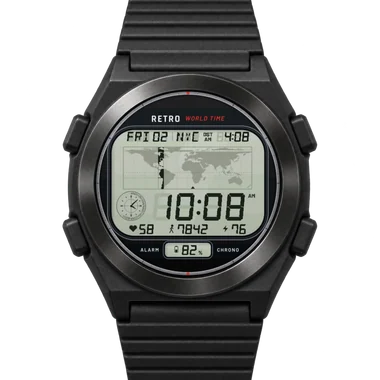
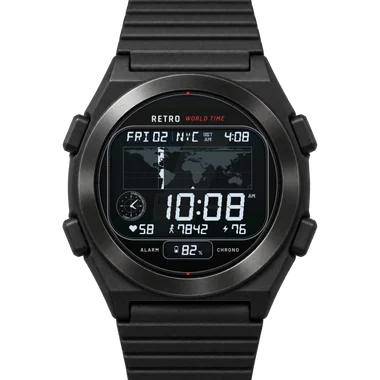
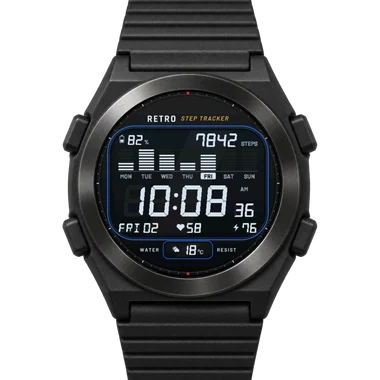
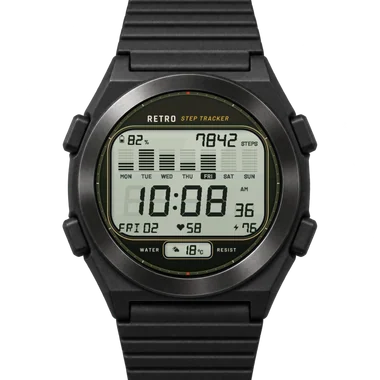
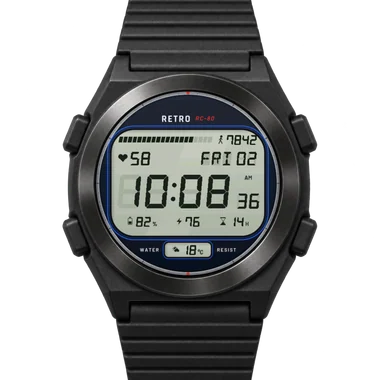
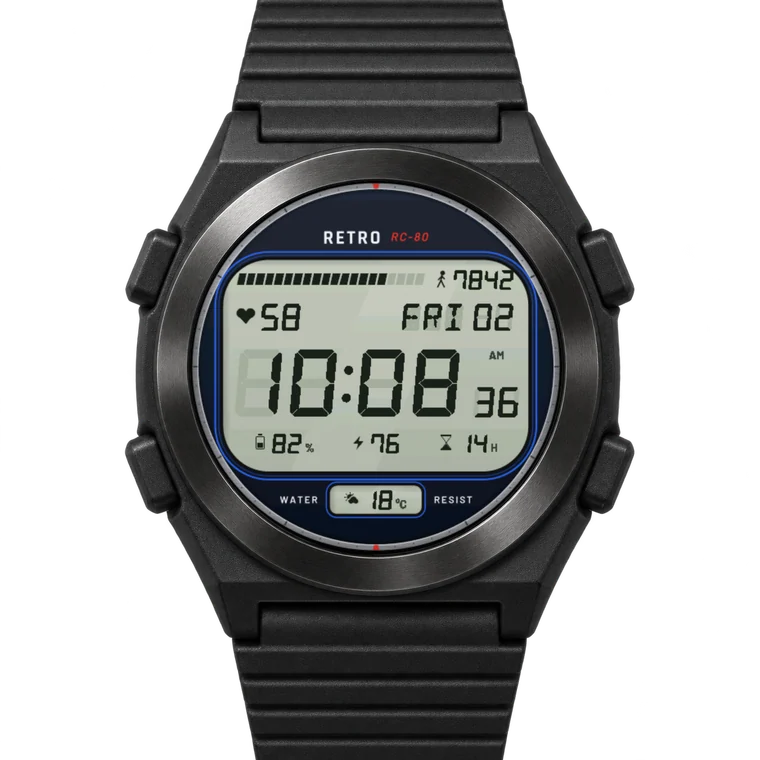
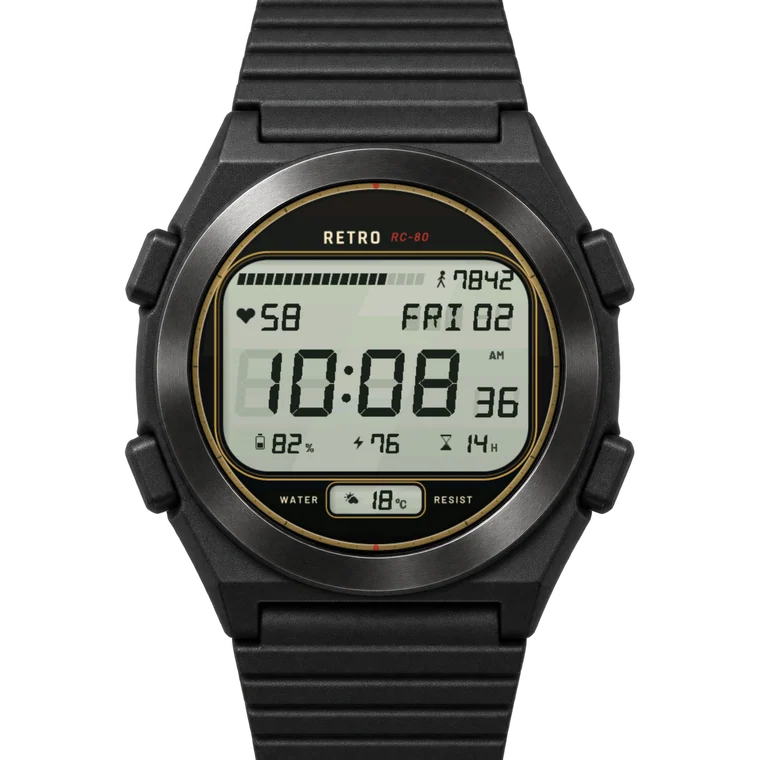
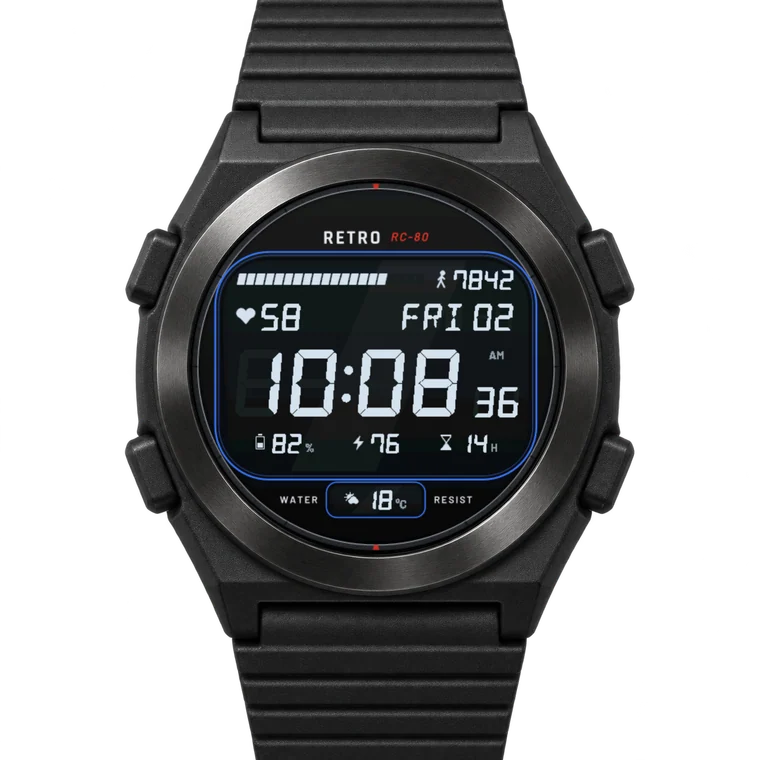
Retro Classic is the steel LCD watch from the 80s, rebuilt to fill your Garmin's round screen: a slim brushed steel bezel with minute marks, a navy plate with blue frame lines, and a big grey-green LCD with real seven-segment digits - the unlit segments show faintly behind the lit ones, like on the old glass. A bar of twenty segments fills up with your steps, your heart rate sits next to the weekday and date, the big time and its seconds fill the middle, three small fields run along the bottom and one more sits in a little window under the glass. Three colourways in the same purchase: Silver, Gold and Black - Black is a negative display, light segments on black glass. Train with my Gym Notes app? Retro Classic can show today's workout from your plan under the little window - "CHEST + BACK", "LEGS" or "REST".
- 6
- Fields
- 20
- Metrics
- 3
- Colourways
- 68
- Watches
the store on your phone
about €4 · one-time purchase · no subscription · v1.5.0 · ★ 5 (1)
Real seven-segment digits, six fields.
Retro Classic is the steel LCD watch from the 80s, rebuilt to fill your Garmin's round screen: a slim brushed steel bezel with minute marks, a navy plate with blue frame lines, and a big grey-green LCD with real seven-segment digits - the unlit segments show faintly behind the lit ones, like on the old glass. A bar of twenty segments fills up with your steps, your heart rate sits next to the weekday and date, the big time and its seconds fill the middle, three small fields run along the bottom and one more sits in a little window under the glass. Three colourways in the same purchase: Silver, Gold and Black - Black is a negative display, light segments on black glass. Train with my Gym Notes app? Retro Classic can show today's workout from your plan under the little window - "CHEST + BACK", "LEGS" or "REST". Off by default.
- 01Real seven-segment LCD digits
- 026 data fields, 19 metrics each
- 033 colourways in one face
- 04Big time with seconds, 12/24 h
- 05Weekday, date and weather
- 06A bigger LCD: slim bezel, big glass
- 07Steps bar of twenty segments
- 08Units follow your watch settings (km/mi, °C/°F, 12/24 h)
Live preview
Switch colourways, themes, accents and settings, or pick your watch to see the face on its own screen.
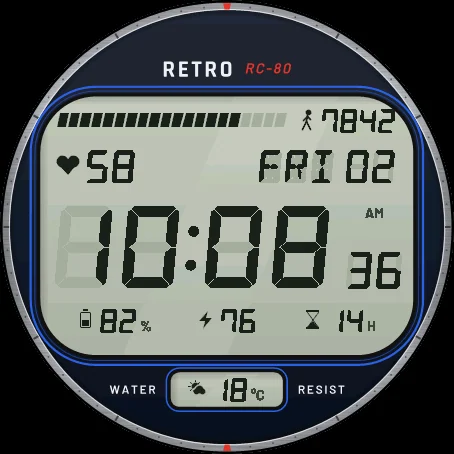
Silver · shown on a 454 × 454 AMOLED screen
Colourway 3
Accent 9
Settings 3
Always-on 2
Every state above is a screenshot of the face running in Garmin's simulator with that setting.
What you can change
Frame colour round the LCD
12 colours or the colourway's own (setting "Frame colour").
Change every metric
Each of the six fields can show any of 19 metrics - battery, Body Battery, recovery time, heart rate, steps, weekly running distance, weather, calories, floors climbed, active minutes, distance today, stress, notifications, altitude, sunrise/sunset, respiration, pulse ox, battery days left, air pressure. The top bar follows its field (steps, battery, stress ...).
Remove any metric
Set a field to "Empty" and it is gone. Remove them all for a clean LCD with only the time.
All 3 colourways included in one purchase
Silver, Gold, Black - switch any time (setting "Colourway").
12 or 24-hour time as your watch is set; the AM/PM marker (on by default) and the hour's leading zero are settings too ("AM/PM marker", "Leading zero").
The date your way (setting "Date line")
With the week, without it or with the month, or off - the date segments stay unlit like a real LCD.
Always-on display like the face or minimal, dim to bright; the full face on solar/MIP watches.
Change everything on the watch or in the Connect IQ app; every change shows at once.
20 metrics for every field.
Each of the 6 fields shows any of them, or nothing at all. Swap them any time on the watch or in the app.
Health6
- Body Battery
- Recovery time
- Heart rate
- Stress
- Respiration
- Pulse Ox
Activity6
- Steps
- Running this week
- Calories
- Floors climbed
- Active minutes
- Distance today
Weather & sky4
- Weather
- Altitude
- Sunrise / sunset
- Air pressure
Watch4
- Battery
- Notifications
- Battery days left
- Next event
Settings
Straight from the face's own settings. Change them on the watch (hold UP/MENU on the face, then Watch face › Customize) or in the Connect IQ app (My Device › Watch Faces › Retro Classic › Settings).
Time & date
- Leading zero
- As the watch · Always · Never
- AM/PM marker
- On · Off
- Date line
- Day, date and week · Off · Day and date · Day, date and month
Look
- Gym Notes workout
- On · Off
Colour
- Frame colour
- 13 choices: The colourway's own, Gold, Silver, Red, Orange …
Always-on
- Sleep mode
- Minimal: time + heart rate · Full dial
- Always-on display
- Like the face · Minimal
- Always-on brightness
- Dim · Normal · Bright
68 Garmin watches.
Forerunner 16
- Forerunner 970AMOLED · 454×454
- Forerunner 965AMOLED · 454×454
- Forerunner 570 47mmAMOLED · 454×454
- Forerunner 265AMOLED · 416×416
- Forerunner 570 42mmAMOLED · 390×390
- Forerunner 170AMOLED · 390×390
- Forerunner 170 MusicAMOLED · 390×390
- Forerunner 165AMOLED · 390×390
- Forerunner 165 MusicAMOLED · 390×390
- Forerunner 70AMOLED · 390×390
- Forerunner 265sAMOLED · 360×360
- Forerunner 955 / SolarMIP · 260×260
- Forerunner 255MIP · 260×260
- Forerunner 255 MusicMIP · 260×260
- Forerunner 255sMIP · 218×218
- Forerunner 255s MusicMIP · 218×218
fēnix 21
- fēnix 8 47mm / 51mm / tactix 8 47mm / 51mm / quatix 8 47mm / 51mmAMOLED · 454×454
- fēnix 8 Pro 47mm / 51mm / MicroLED / quatix 8 Pro 47mm / 51mmAMOLED · 454×454
- fēnix 9 47mm / 51mmAMOLED · 454×454
- fēnix 9 Pro 47mmAMOLED · 454×454
- fēnix 9 Pro 51mmAMOLED · 466×466
- fēnix 8 43mmAMOLED · 416×416
- fēnix 9 43mmAMOLED · 416×416
- fēnix 9 Pro 43mmAMOLED · 416×416
- fēnix 7 / quatix 7MIP · 260×260
- fēnix 7 ProMIP · 260×260
- fēnix 7 Pro - Solar Edition (no Wi-Fi)MIP · 260×260
- fēnix 7X / tactix 7 / quatix 7X Solar / Enduro 2MIP · 280×280
- fēnix 7X ProMIP · 280×280
- fēnix 7X Pro - Solar Edition (no Wi-Fi)MIP · 280×280
- fēnix 7SMIP · 240×240
- fēnix 7S ProMIP · 240×240
- fēnix 8 Solar 47mmMIP · 260×260
- fēnix 8 Solar 51mm / tactix 8 Solar 51mmMIP · 280×280
- fēnix 9 Pro Solar 47mmMIP · 260×260
- fēnix 9 Pro Solar 51mmMIP · 280×280
- fēnix EAMOLED · 416×416
vívoactive 2
- vívoactive 6AMOLED · 390×390
- vívoactive 5AMOLED · 390×390
Venu 7
- Venu 3SAMOLED · 390×390
- Venu 4 41mmAMOLED · 390×390
- Venu 2AMOLED · 416×416
- Venu 2 PlusAMOLED · 416×416
- Venu 3AMOLED · 454×454
- Venu 4 45mm / D2 Air X15AMOLED · 454×454
- Venu 2SAMOLED · 360×360
epix 4
- epix Pro (Gen 2) 42mmAMOLED · 390×390
- epix (Gen 2) / quatix 7 SapphireAMOLED · 416×416
- epix Pro (Gen 2) 47mm / quatix 7 ProAMOLED · 416×416
- epix Pro (Gen 2) 51mm / D2 Mach 1 Pro / tactix 7 – AMOLED EditionAMOLED · 454×454
MARQ 2
- MARQ (Gen 2) Athlete / Adventurer / Captain / Golfer / Carbon Edition / Commander - Carbon EditionAMOLED · 390×390
- MARQ (Gen 2) AviatorAMOLED · 390×390
Approach 5
- Approach S70 42mmAMOLED · 390×390
- Approach S50AMOLED · 390×390
- Approach S72 43mmAMOLED · 416×416
- Approach S70 47mmAMOLED · 454×454
- Approach S72 47mmAMOLED · 454×454
Descent 3
- Descent Mk3 43mm / Mk3i 43mmAMOLED · 390×390
- Descent G2AMOLED · 390×390
- Descent Mk3i 51mmAMOLED · 454×454
Instinct 2
- Instinct 3 AMOLED 45mmAMOLED · 390×390
- Instinct 3 AMOLED 50mmAMOLED · 416×416
D2 4
- D2 Mach 1AMOLED · 416×416
- D2 Air X10AMOLED · 416×416
- D2 Mach 2AMOLED · 454×454
- D2 Mach 2 ProAMOLED · 454×454
Version 1.5.0
First released 6 Oct 2026. Updates are free and install by themselves.
- 1.5.03 Nov 2026
- New setting "Frame colour": the frame lines round the LCD in Gold, Silver, Red, Orange, Lime, Green, Teal, Cyan, Blue, Violet, Magenta or Pink.
- 1.4.11 Nov 2026
- Steps now count towards your own daily step goal from Garmin Connect (it was fixed at 10,000), so 7,500 steps of a 7,500 goal is 100%. Thanks for spotting it!
- 1.4.029 Oct 2026
- New always-on display that looks like the face: its ring, its hands and its own colours - and no digital time when you have switched it off. Brightness: dim, normal or bright (setting "Always-on brightness"); the old minimal screen is still there (setting "Always-on display").
- New date formats (setting "Date line"): the date with the week, without it or with the month (FRI 02 W40, FRI 02, FRI 02 OCT).
- 1.3.029 Oct 2026
- New setting "Date line": show the date, or turn it off (the date segments stay unlit) - change it on the watch or in the Connect IQ app.
- 1.2.028 Oct 2026
- Bigger and easier to read: the bezel is now a slim ring at the very edge, so the whole LCD - the time, the date and every field - is about 8 % larger.
- 1.1.025 Oct 2026
- New setting "AM/PM marker": keep AM/PM on the display (as before) or switch it off.
- New setting "Leading zero": the hour as the watch shows it, always with a zero (09:41) or never (9:41).
Why do I see "--" for body Battery, recovery time and weekly running distance?
Body Battery, recovery time and weekly running distance are shown only when the watch provides them; otherwise "--".
Weather is the current value synced from the phone?
Weather is the current value synced from the phone.
The steps bar follows your own daily step goal from Garmin Connect?
The steps bar follows your own daily step goal from Garmin Connect.
The weekday is shown in English, like on the LCD watches it comes from?
The weekday is shown in English, like on the LCD watches it comes from.
On solar/MIP watches (64 colours) the LCD is shown in plain grey and black, without the faint unlit segments?
On solar/MIP watches (64 colours) the LCD is shown in plain grey and black, without the faint unlit segments.
How do I change a field or a colour?
On the watch: hold the middle-left (UP/MENU) button on the watch face, choose Watch face, then Customize. In the phone: open the Connect IQ app, go to My Device, Watch Faces, Retro Classic, then Settings. Every change shows at once.
Is it a subscription?
No. You buy it once in the Connect IQ store and keep every future update.
Does it drain the battery?
The face is built to be as frugal as a Garmin face: it redraws once a minute and the always-on screen is dimmed and minimal on AMOLED watches.